
In the Admin panel → Events you control two things: Send kiosk events to HA 1 so Home Assistant can react to idle, fade, admin, and error events, and Send analytics to app developer so you can help improve the app. This article explains both options.
What you’ll need #
- Admin panel open (swipe from left edge, then PIN or biometrics if required).
- For Send kiosk events to HA (and presence-related events): an active Pro subscription and the Custom Kiosk Events integration (or legacy setup) configured in Home Assistant.
Opening the Events section #
In the admin sidebar, tap Events. The section expands and shows:
- Send kiosk events to HA
- Presence detection
- Send analytics to app developer
Each has an info icon and a toggle.
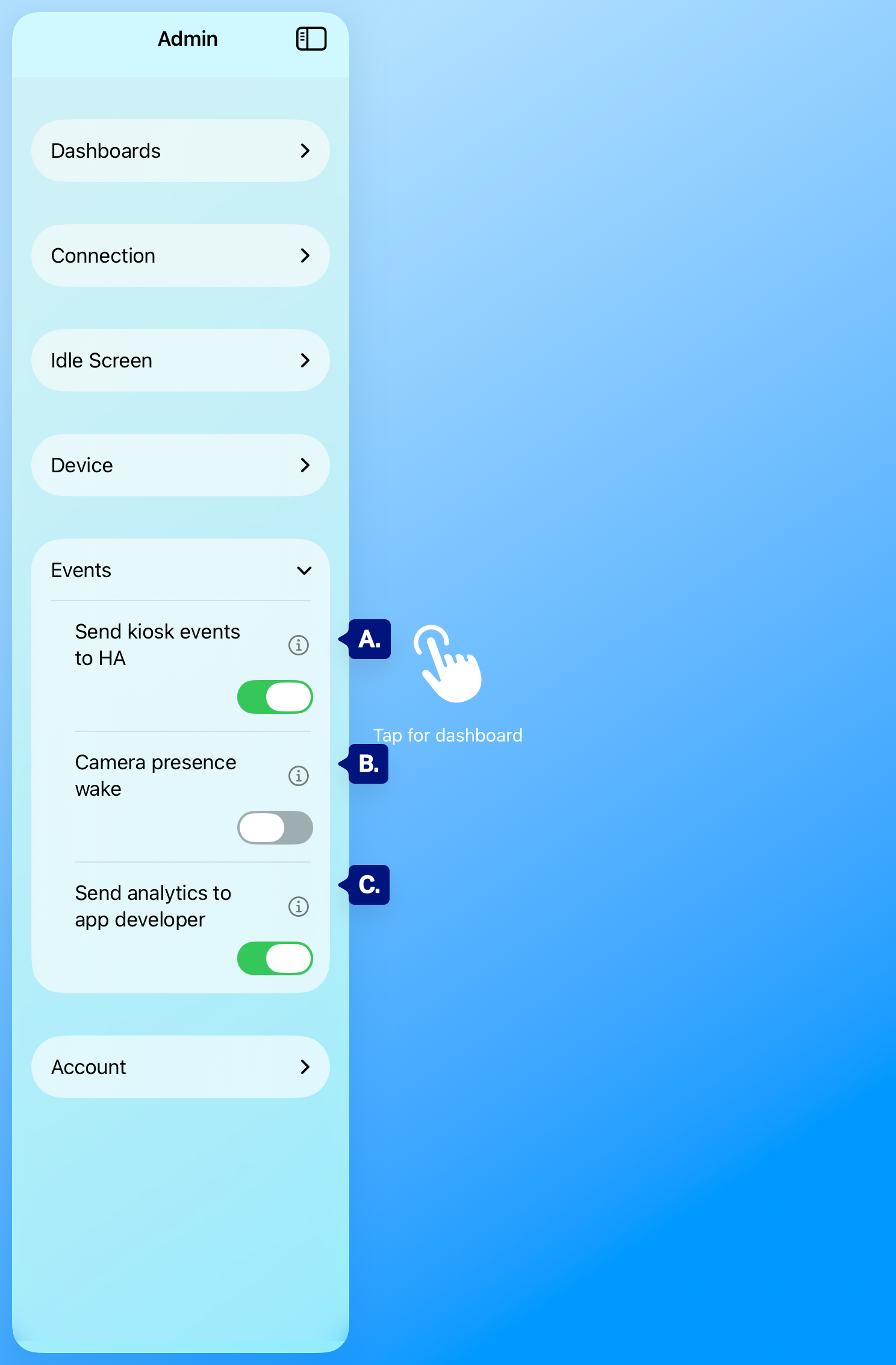
A. Send kiosk events to HA
B. Presence detection
C. Send analytics to app developer
Send kiosk events to HA (Pro) #
When Send kiosk events to HA is on 1, the app sends events to your Home Assistant instance so you can use them in automations, webhooks, and sensors.
Events include:
- idle_start / idle_end — Idle screen appears or is dismissed.
- fade_to_black_start / fade_to_black_end — Screen fades to black or wakes.
- admin_open / admin_close — Admin panel is opened or closed.
- error — The app reports an error (e.g. load failed), with optional error_type.
Home Assistant receives these via the Custom Kiosk Events integration (Webhook ID ha-dashboard-kiosk-wh or REST). You can trigger automations on kiosk_event_received (or ha_dashboard_kiosk with REST), show counters in Lovelace, and optionally get notifications (e.g. when admin is opened or an error occurs). Set up the integration first; see Home Assistant integration.
[see A. above]

Presence detection #
Presence detection lets the app detect when someone is at the kiosk and update a presence signal you can use in automations—without tracking identity or precise location.
When Presence detection is on:
- Detection runs entirely on-device, using Apple’s best practices for app lifecycle and privacy.
- The app does not collect or send video, audio, or personal identifiers. It only reports a simple “kiosk in use” / “kiosk not in use” state.
- Any signals sent off the device go only to your own Home Assistant (via the Custom Kiosk Events integration) or to local automations you configure.
Depending on your setup, the Custom Kiosk Events integration can work in two ways:
- Presence entity in Home Assistant
- Exposes a dedicated presence entity (e.g. binary_sensor.kiosk_presence) that shows when the kiosk is in use.
- Use it directly in dashboards and automations (e.g. trigger when the entity turns on or off).
- Presence data in kiosk_event_received
- Adds presence-related data to the kiosk_event_received event payload.
- Use automations that react when presence changes state (for example, when presence turns “on” to run a scene, or “off” to power down lights).
Typical use cases:
- Turn lights on or brighten a scene when someone is at the kiosk.
- Turn off accent lighting or nearby screens when the kiosk is not in use.
- Log or graph kiosk usage over time using the presence entity in Home Assistant.
[See B. above]
Send analytics to app developer #
Send analytics to app developer controls whether the app sends anonymous usage analytics (e.g. events, feature use) to help improve the product. When on, data is sent in line with the app’s privacy policy. When off, analytics are not sent. This does not affect Send kiosk events to HA; that setting only controls events sent to your Home Assistant.
NOTE: events are anonymous and are used to understand how the product is being used and to help improve the product.
[See C. above]
Troubleshooting #
- Send kiosk events to HA is grayed out – This option requires Pro. Subscribe in Admin → Account → Pro Features.
- Events not showing in Home Assistant – Ensure Send kiosk events to HA is on, the Custom Kiosk Events integration is installed and configured (Webhook or REST), and the app can reach your Home Assistant URL. Check Developer Tools → Events for kiosk_event_received (Webhook) or ha_dashboard_kiosk (REST). See Events not received in Home Assistant in Troubleshooting.
- Presence detection not updating in Home Assistant – Confirm Presence detection is on in Admin → Events and that your integration or automations are using the presence entity or presence-related data it exposes.
- Analytics vs. HA events – “Send analytics to app developer” is separate from “Send kiosk events to HA” and “Presence detection.” Analytics go to the app developer; kiosk events and presence go only to your Home Assistant via the integration.